

Pakistan to Get Voice-Activated Banking Apps
Pakistan to Get Voice-Activated Banking Apps: The banking landscape in Pakistan is on the verge of a significant transformation. United Bank Limited (UBL), one of the country’s leading banks, is set to introduce voice-activated features in its mobile app, allowing customers to perform a wide range of financial transactions using just their voice. From sending money to family and friends to paying utility bills or recharging mobile phones, the new system promises convenience and speed, making banking easier than ever before.

This new voice-enabled system is designed to simplify everyday banking tasks, save time, and enhance accessibility for users across Pakistan. However, while it offers great ease, it also requires robust security measures to ensure that transactions remain safe and protected from unauthorized access. This article provides a complete guide for UBL customers and others interested in voice-activated banking, explaining how the feature works, its benefits, potential risks, and step-by-step instructions for using it.
How Voice-Activated Banking Will Work
Voice-activated banking allows customers to control their banking app using spoken commands instead of navigating through complex menus. By simply saying a command like “Send money to Zainab,” the app can execute the requested transaction quickly and accurately.
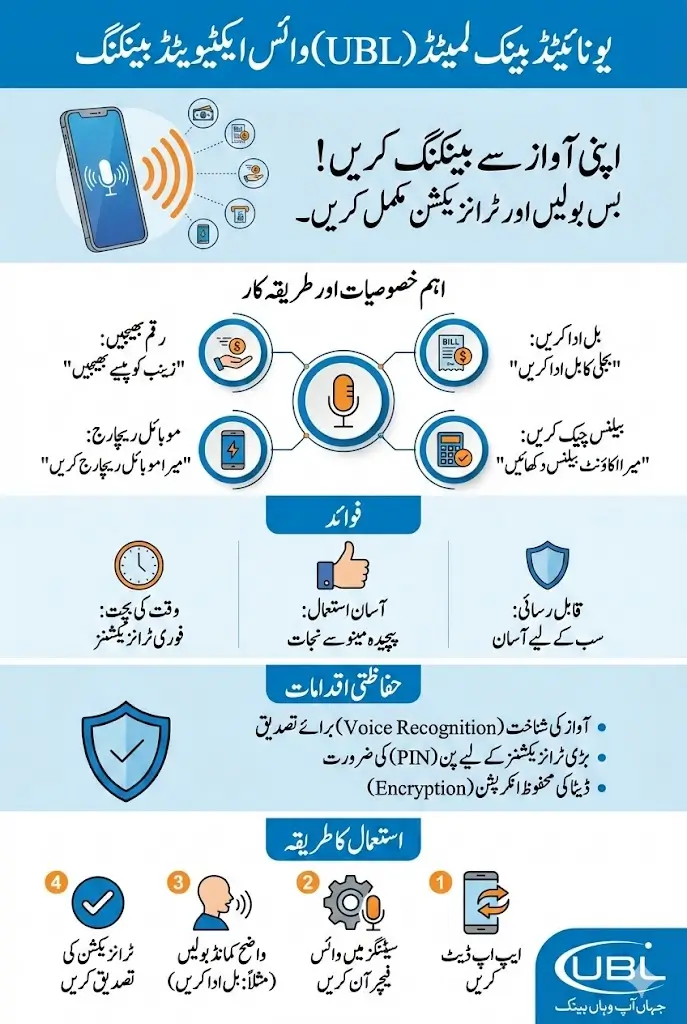
The technology uses advanced voice recognition systems to identify the account holder and understand specific commands. In addition to sending money, customers can:
- Check account balances and recent transactions
- Pay utility bills such as electricity, gas, and water
- Recharge mobile phones or add credit
- Request mini statements or transaction summaries
- Schedule future payments or transfers
This technology is designed to be user-friendly, catering to both tech-savvy individuals and those who may not be familiar with digital banking apps. With voice commands, traditional banking procedures are streamlined, saving time and effort for everyone.
Benefits of Voice-Activated Banking in Pakistan
Voice banking offers numerous advantages for customers who want fast, efficient, and accessible financial services. It reduces the dependency on manual navigation and simplifies complicated banking tasks.
- Instant transactions without navigating app menus
- Access banking services hands-free, ideal for multitasking
- Reduce time spent on routine banking operations
- Simplify digital banking for users unfamiliar with apps
- Improve financial management with easy access to statements
With these advantages, UBL’s voice-activated banking feature is expected to appeal to a wide audience, from busy professionals to students and senior citizens who want more convenient banking solutions.
How to Use Voice Banking with UBL Mobile App
Getting started with UBL’s voice banking is simple. Customers must first ensure that their mobile app is updated to the latest version. Once updated, users can enable the voice command feature from the settings menu.
- Open the UBL mobile app and navigate to Settings
- Enable voice banking or voice command feature
- Register your voice for authentication
- Say commands clearly to perform transactions, such as sending money or paying bills
- Confirm the transaction if required by the app
After setup, users can perform a variety of transactions with voice commands alone, saving time and effort. Regularly updating the app ensures access to the latest security patches and features.
Transactions You Can Perform Using Voice Commands
UBL’s voice-activated banking will allow users to manage most daily banking activities efficiently. Key transactions include:
- Sending money to other UBL accounts or other banks
- Paying utility bills, including electricity, gas, and water
- Recharging mobile phones for prepaid accounts
- Requesting account statements and recent transactions
- Scheduling payments for future dates
These transactions are designed to be intuitive and easy, making banking accessible for all age groups.
Security Considerations for Voice Banking
While voice banking offers convenience, it also raises security concerns. Anyone with access to your phone could potentially initiate transactions if security measures are not properly implemented.
- Voice recognition authentication to verify the account holder
- PIN or password confirmation for large transactions
- Encryption of all voice commands and data transfers
- Automatic logout after inactivity
These measures aim to make voice banking as secure as possible, protecting users’ accounts from unauthorized access.
Also Read: 8171 Benazir Income Support Programme 2026: PMT Requirements, Online 13500 Qist Confirmation
Step-by-Step Guide to Sending Money via Voice
Sending money using voice commands is one of the most sought-after features in the new system. Here’s how to do it safely and efficiently:
- Open the UBL app and activate voice banking
- Clearly say “Send money to [Recipient Name]”
- Enter the amount either by voice or manual confirmation if requested
- Confirm the transaction with your security PIN
- Receive an instant notification of successful transfer
This process ensures that money transfers are fast, easy, and secure, even for those unfamiliar with online banking.
Step-by-Step Guide to Paying Bills via Voice
Paying bills is another convenient feature of UBL’s voice banking. Users can pay electricity, gas, water, and mobile bills without navigating complex menus.
- Open the UBL app and activate voice commands
- Say “Pay my electricity bill” or the relevant bill type
- Provide account details or select from saved billers
- Confirm payment amount and security PIN if prompted
- Receive instant confirmation of successful bill payment
This reduces the time spent on bill payments and makes it easier to manage monthly expenses.
Step-by-Step Guide to Checking Account Statements via Voice
Voice banking also allows users to access account information instantly. Customers can check balances or recent transactions by simply speaking a command.
- Open the UBL mobile app and enable voice banking
- Say “Show my recent transactions” or “Check my account balance”
- The app will verify your voice and display requested information
- Save or download statements for record-keeping if needed
This feature is particularly helpful for users who need quick access to account details without manually navigating the app.
Also Read: NADRA Simplifies Vehicle Sale and Purchase Biometric Verification in Sindh Through Pak-ID Mobile App
Step-by-Step Guide to Recharging Mobile Phones via Voice
UBL’s voice banking can also recharge prepaid mobile accounts, making mobile top-ups faster and simpler.
- Activate voice commands in the UBL app
- Say “Recharge my mobile with [Amount]”
- Choose the mobile number from saved contacts or enter manually
- Confirm the transaction via security PIN if prompted
- Receive instant notification of successful recharge
This ensures that users never face mobile service interruptions due to delayed recharges.
Table: Key Voice Banking Transactions
Before we move to additional benefits, here’s a table summarizing UBL’s voice-activated transactions:
Transaction Type Word Command Example Notes
Send Money “Send money to Zainab” Instant transfer to any account
Pay Bills “Pay my electricity bill” Supports all major utilities
Check Statements “Show recent transactions” Quick access to account info
Mobile Recharge “Recharge my mobile with 500” Works for all prepaid numbers
Schedule Payment “Schedule payment for 5th Jan” Future payments without manual input
The table above shows the simplicity and versatility of UBL’s new voice banking system.
Tips for Safe Use of Voice Banking
While the feature is convenient, users must ensure safety. Protecting your account from misuse is crucial.
Some key tips include:
- Always enable voice authentication before performing transactions
- Avoid leaving your phone unattended while logged into the banking app
- Regularly update the app for latest security updates
- Use strong PINs and passwords for extra protection
- Log out of the app after completing transactions
Following these tips ensures a secure and smooth experience with UBL’s voice-activated banking.
Also Read: Omoda & Jaecoo Have Confirmed the Launch of the JAECOO J5 HEV With Hybrid and Safety Features
Future Prospects of Voice Banking in Pakistan
Voice banking is expected to grow rapidly in Pakistan as more banks introduce similar features. It will likely become a standard feature, helping customers manage finances efficiently and with greater accessibility.
Potential future advancements may include:
- AI-based financial assistance for smarter transaction suggestions
- Enhanced multilingual support for local languages
- Integration with other digital services such as online shopping
- Advanced fraud detection using AI and behavioral analytics
As the technology evolves, it will make financial services more inclusive and accessible to people across the country.
Conclusion
UBL’s introduction of voice-activated banking is a game-changer for Pakistan’s digital banking sector. It simplifies everyday financial tasks, making sending money, paying bills, checking statements, and recharging mobile phones faster and more convenient. Customers should ensure their apps are updated, enable proper security settings, and use the system responsibly to maximize benefits.
Voice banking is set to make financial transactions more accessible to everyone, saving time and reducing the complexities of traditional banking apps. With proper precautions, it promises a secure, efficient, and highly convenient way to manage money in Pakistan.
Also Read: Govt Announces SOPs for Basant 2026: A Complete Guide To the New Kite Flying Regulations For Punjab
Frequently Asked Questions
What is voice-activated banking?
Voice banking allows users to perform transactions using spoken commands instead of navigating app menus.
Which transactions can be done using voice commands?
You can send money, pay bills, recharge mobile phones, check statements, and schedule payments.
Is voice banking safe to use?
Yes, with proper voice authentication, PIN verification, and updated app security measures.
Do I need to update my UBL app for voice banking?
Yes, the latest app version is required to access voice-activated features.
Can anyone else use my voice to perform transactions?
No, the system uses voice recognition to verify your identity before processing transactions.