

NADRA Simplifies Vehicle Sale and Purchase Biometric Verification
Vehicle Sale and Purchase Biometric Verification: The National Database and Registration Authority (NADRA) has introduced a streamlined process for vehicle sale and purchase verification in Sindh through the Pak-ID mobile application. This initiative allows citizens to complete biometric verification remotely, eliminating the need to visit NADRA offices physically. By adopting mobile verification, the authority aims to simplify vehicle transactions, save time, and make the process more convenient for the public.
With the Pak-ID mobile app, vehicle buyers and sellers can conduct their biometric verification directly from their homes. Once verification is completed, the vehicle transfer process can proceed at the relevant departments without unnecessary delays. This approach reflects NADRA’s commitment to modernizing services and promoting digital solutions for administrative processes.
Also Read: Omoda & Jaecoo Have Confirmed the Launch of the JAECOO J5 HEV With Hybrid and Safety Features
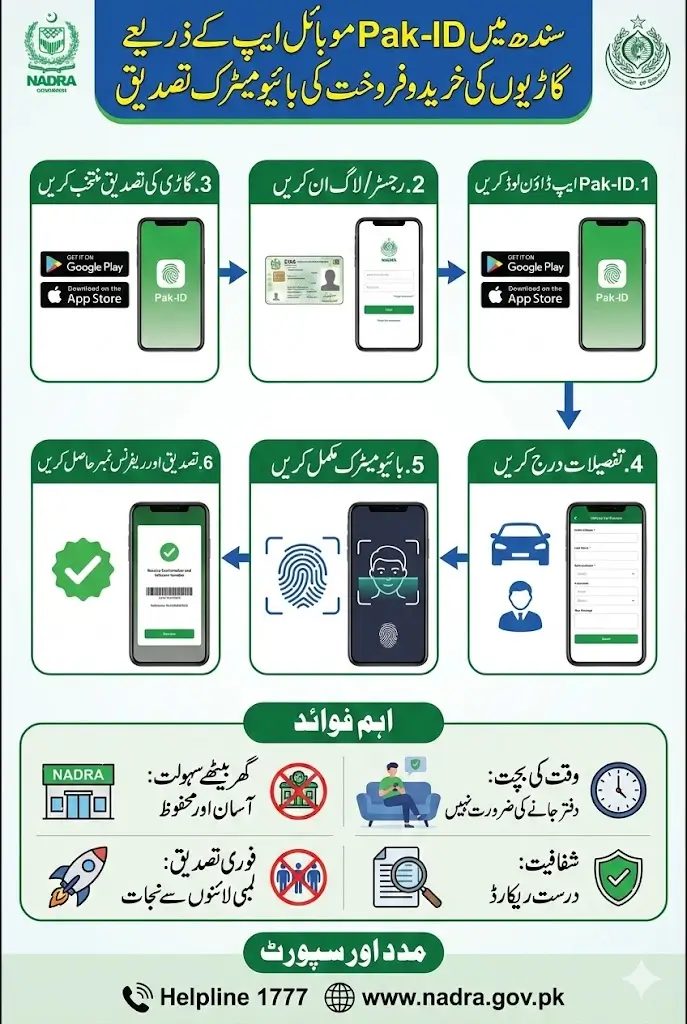
Overview of Pak-ID Mobile Verification for Vehicles
The Pak-ID mobile application serves as a digital platform for biometric verification required during vehicle sale and purchase. The system is designed to verify the identity of vehicle owners and ensure secure and transparent transfer processes.
Citizens in Sindh can now use the app to complete the entire verification without needing to step into NADRA offices. This reduces queues, waiting times, and travel costs while ensuring official records are updated accurately. The application also provides a safe, user-friendly interface suitable for all age groups familiar with mobile technology. The Pak-ID app brings convenience, security, and efficiency to vehicle transactions in Sindh, aligning with the broader digitalization strategy of NADRA.
Step-by-Step Guide to Biometric Verification via Pak-ID
Before going into details, here are key steps citizens need to follow for mobile-based vehicle verification:
| Step | Action | Notes |
|---|---|---|
| 1 | Download Pak-ID App | Available on Google Play & Apple Store |
| 2 | Register / Login | Use CNIC credentials |
| 3 | Select Vehicle Verification | Choose the sale or purchase option |
| 4 | Enter Details | Vehicle & personal info |
| 5 | Complete Biometric | Fingerprint or facial recognition |
| 6 | Receive Confirmation | Reference number for transfer |
Following these steps ensures that your vehicle sale or purchase verification is completed efficiently and accurately.
Features of Pak-ID Mobile App for Vehicle Verification
The Pak-ID app offers multiple features that make vehicle verification easier and more secure:
- Mobile-based biometric verification from home
- Real-time authentication and record updating
- User-friendly interface for seamless navigation
- Integration with NADRA databases for accurate identity checks
- Notifications and status updates on verification progress
- Customer support via helpline 1777 for assistance
These features allow citizens to complete vehicle transactions confidently while reducing administrative burdens and travel needs.
Benefits of Using Pak-ID for Vehicle Transactions
Using the Pak-ID mobile app for vehicle sale and purchase verification brings multiple advantages:
- Saves time by eliminating in-person visits
- Reduces administrative workload for NADRA offices
- Increases accuracy in identity verification and record-keeping
- Provides convenience for citizens in remote areas
- Ensures a secure digital platform for sensitive personal and vehicle data
The app promotes efficiency, transparency, and security in vehicle-related transactions across Sindh.
Common Challenges and How to Overcome Them
While the Pak-ID app simplifies verification, users may face occasional challenges:
- Mobile compatibility issues with older devices
- Difficulty in capturing fingerprints or facial scans
- Slow internet connectivity affecting verification speed
- Confusion in entering vehicle or CNIC details correctly
Solutions:
- Ensure the app is updated to the latest version
- Follow on-screen instructions carefully for biometric scanning
- Use stable internet connections during verification
- Contact NADRA helpline 1777 for immediate assistance
Understanding these challenges and solutions ensures smooth use of the Pak-ID app.
Tips for a Smooth Verification
- Keep your CNIC and vehicle documents ready before starting
- Ensure your mobile camera and fingerprint sensor are functioning
- Complete verification in a well-lit environment
- Double-check all details before submitting
- Follow up on notifications from the app regarding verification status
Following these tips can help avoid delays and errors during vehicle sale or purchase verification.
How NADRA Supports Citizens
NADRA provides multiple channels for support during the Pak-ID verification process:
- Dedicated helpline: 1777 for mobile users
- Official website: www.nadra.gov.pk for guidance and updates
- FAQs and tutorials within the Pak-ID app
- Assistance for app installation and troubleshooting
NADRA ensures that citizens have access to guidance and support to make vehicle transactions hassle-free.
Final Thoughts
The introduction of Pak-ID mobile verification for vehicle sale and purchase in Sindh represents a significant step toward digital governance and citizen convenience. By reducing the need for physical visits to offices and integrating biometric verification into a mobile platform, NADRA is modernizing administrative processes.
Citizens are encouraged to download the Pak-ID app, follow the verification steps carefully, and make use of support channels as needed. This service not only saves time but also ensures secure and accurate vehicle transfers.
Also Read: 8171 New Registration Process Via Dynamic Survey For Quarterly Qist 13,500: Step-by-Step Method 2026
FAQs
How can I verify my vehicle sale or purchase through Pak-ID?
Download the Pak-ID app, register with CNIC, and follow the in-app instructions for biometric verification.
Do I need to visit a NADRA office for verification?
No, the entire biometric verification can be completed from home via the Pak-ID mobile app.
Is the Pak-ID app available for all mobile devices?
The app is available for both Android and iOS devices; ensure your device is compatible
What should I do if the biometric scan fails?
Follow the app instructions carefully or contact NADRA helpline 1777 for assistance.
Where can I get more information about vehicle verification?
Visit NADRA’s official website at www.nadra.gov.pk or consult the app’s help section.