

Maryam Ko Batain App
The Government of Punjab has launched a special Ramadan relief initiative to support low-income families under the Ramzan Nigehban Package. Through this program, eligible households can receive Rs. 10,000 financial assistance to manage essential expenses during the holy month of Ramadan. Rising inflation has made it difficult for many families to afford daily necessities like flour, sugar, rice, cooking oil, and pulses. This package aims to reduce that burden and ensure that deserving families can observe Ramadan with dignity.
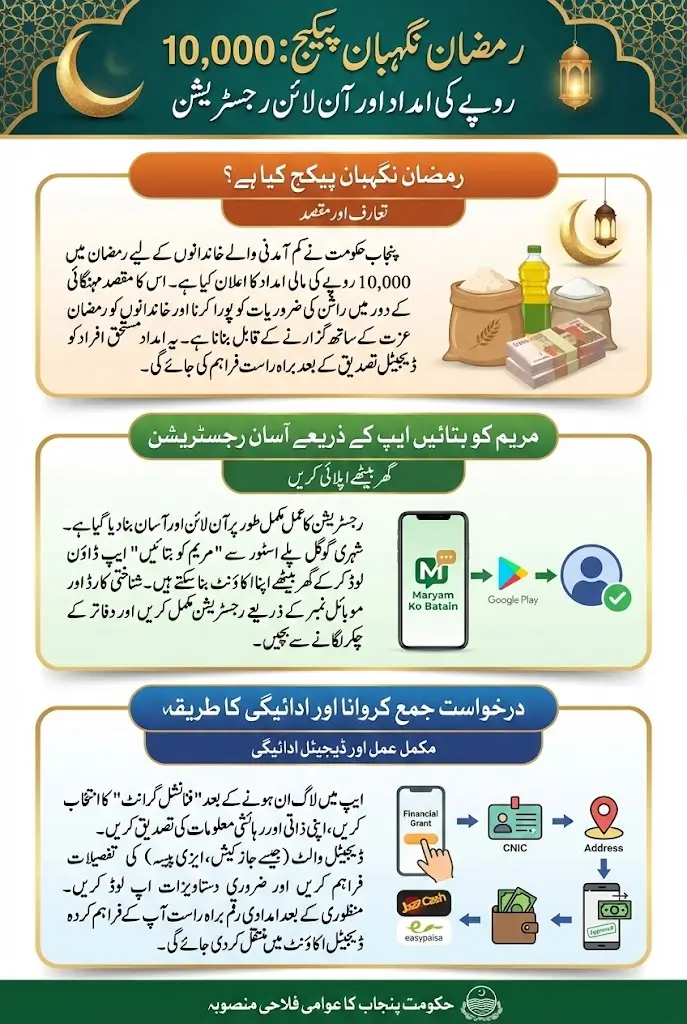
To make the process simple and accessible, the government has enabled online registration through the Maryam Ko Batayn App. This mobile application allows applicants to complete the entire enrollment process from home using their smartphones. In this detailed guide, you will learn every step of the registration process clearly, so even first-time users can apply without confusion.
Also Read: Tell Maryam Nawaz Portal 2026
What Is the Ramzan Nigehban Package?
The Ramzan Nigehban Package is a special Ramadan relief program introduced by the Punjab government to provide financial support to deserving families. Under this scheme, eligible households receive Rs. 10,000 to help cover grocery and daily household expenses during Ramadan.
The purpose of this initiative is to ensure that financially struggling families can focus on religious observance without worrying about food shortages. Instead of distributing ration bags physically, the government is providing direct financial support so families can purchase items according to their needs. This system is transparent and based on digital verification. Only families who meet eligibility criteria will receive the assistance after proper screening.
What Is the Maryam Ko Batain App?
The Maryam Ko Batain App is an official digital platform developed by the Punjab government to improve public service delivery. It connects citizens with various government departments and allows them to submit applications, complaints, and requests online.
Through this app, citizens can:
- Register for government relief programs
- Apply for financial assistance
- Request medical emergency support
- Submit civic complaints
- Track application status in real time
For the Ramzan Nigehban Package, this app acts as the main enrollment portal. Applicants do not need to visit any office or submit paper forms. Everything can be done through mobile registration.
Also Read: 9999 Ramzan Relief Package By PM In 2026
Who Is Eligible for the Rs. 10,000 Ramzan Nigehban Package?
Before starting registration, it is important to understand eligibility criteria. The program is designed specifically for deserving families.
Generally, eligible applicants include:
- Low-income households residing in Punjab
- Families registered in government welfare databases
- Individuals who are not government employees
- Families without large businesses or properties
- Households with limited monthly income
Eligibility is verified through official government records. Providing false information can result in disqualification.
Documents and Information Required Before Registration
Before opening the app and starting the enrollment process, make sure you have the necessary details ready. This will help you complete the process smoothly.
You Must have:
- Valid CNIC number
- Mobile number registered under your CNIC
- Complete home address
- Family member details
- Monthly income information
- Any existing welfare registration details (if applicable)
Entering accurate information is extremely important. Incorrect CNIC numbers or wrong phone numbers may lead to rejection or delays.
Also Read: BISP Kafaalat Payment Raised to Rs. 14,500 Quarterly In 2026
Complete Step-by-Step Registration Process Through Mobile
Now let’s understand the full registration procedure in detailed steps.
Step 1: Download the Maryam Ko Batain App
- Open the Google Play Store on your Android mobile phone.
- Type Maryam Ko Batain App in the search bar.
- Identify and select the official government application.
- Click Install to download the app.
- Wait until the installation completes.
- Open the app once the installation finishes.
- Make sure the app is official to avoid security risks or scams.
Always verify the official developer name before installing any government-related app.
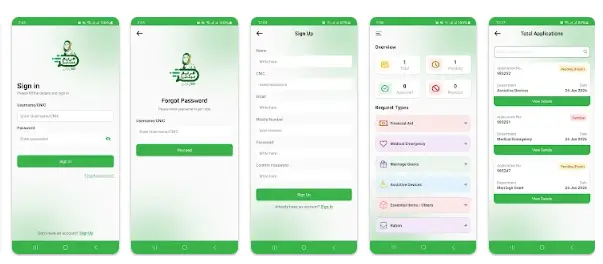
Step 2: Create Your Account (Sign-Up Process)
- When the app opens for the first time, you will see two options: Sign In and Sign Up.
- If you are a new user, choose Sign Up.
- A registration form will appear requiring the following information:
- Full Name (exactly as on your CNIC)
- CNIC Number
- Email Address
- Mobile Number (registered in your name)
- Create Password
- Confirm Password
- Enter all information carefully and accurately.
- Ensure both password fields match each other.
- Click Sign Up to complete your registration form submission.
Use a mobile number that is active and always accessible, as all notifications will arrive there.
Step 3: OTP Verification
- After clicking then login, an OTP (One-Time Password) may be sent to your mobile number or on email
- Open your SMS inbox to view the received OTP.
- Enter the OTP in the given field inside the app.
- If the OTP does not arrive immediately, wait a few moments and request a new one.
- Once verified, your account will be successfully created.
- You will be redirected to the main dashboard of the application.
Never share your OTP with anyone, as it is used to secure your account.
Step 4: Log In to Your Account
- Once your account is created, log in using your CNIC number and password.
- After logging in, you will see the main dashboard containing different services.
- Look for options related to Ramzan Nigehban Package, Financial Assistance, or Financial Grant depending on the service you want to apply for.
Remember your password or save it in a secure place to avoid login issues later.
Financial Grant Application Process After Login
Step 1: Open Dashboard After Login
- Enter your CNIC and password to access your account.
- The dashboard will appear showing several service options.
- Locate the option labeled Financial Grant.
- Click on Financial Grant to begin your application.
- The application form includes three structured steps.
Take your time before selecting an option to ensure you choose the correct service.
Step 2: Personal Information (Auto-Filled)
Information You Will See:
- Full Name
- CNIC Number
- Date of Birth
- Mobile Number
- Basic details fetched from government records
What You Must Do:
- Read all details carefully.
- Confirm the accuracy of:
- CNIC number
- Name spelling
- Date of birth
- Mobile number
If Any Detail Is Incorrect:
- If editable, correct it immediately.
- If not editable, update your profile from the profile section first.
- Incorrect details may result in rejection or payment problems.
When done, click the Next button.
Double-check your CNIC number because even one wrong digit can cause your application to fail.
Step 3: Add Your Location Details
Select District:
- Open the dropdown list.
- Choose the district where you actually live.
Select City:
- After selecting the district, choose your city from the list.
Enter Complete Address:
- Provide a complete address including:
- House or flat number
- Street name
- Area or town name
- Any nearby landmark (optional but helpful)
If Map Pin Option Is Available:
- Open the map feature.
- Allow the app to access your location.
- Pin your exact house location.
- Confirm the pinned location before moving ahead.
Important Guidelines:
- Avoid using incomplete or incorrect addresses.
- Never use someone else’s address.
- Try to match your CNIC address if it is still valid.
When done, click the Next button. Write your address clearly to avoid delays during verification.
Step 4: Department, Category, and Digital Wallet Details
This step determines where your application is sent, what type of assistance you need, and how you will receive payment.
Part 1: Select Department
- Open the department dropdown.
- Choose the department relevant to your request.
- Select based on the correct nature of the financial help required.
Part 2: Select Request Category
- Select the category that describes your need.
- Common categories include:
- Emergency assistance
- Ramadan relief
- Medical support
- General financial aid
Part 3: Select Request Sub-Category
- Select the sub-category that provides more clarity about your situation.
- This helps authorities review your case properly.
- Wrong selection can delay the approval process.
Part 4: Digital Wallet Information
The app will ask whether you have a digital wallet account.
If You Select Yes:
- Choose your wallet provider:
- JazzCash
- Easypaisa
- UBL Omni
- UPaisa
- Enter your wallet account number accurately.
- Ensure the number belongs to you and is active.
- Recheck all digits before moving forward.
- Payments will be sent to this wallet if approved.
If You Select No:
- You may receive future instructions on payment collection.
- Follow official SMS notifications.
Part 5: Request Details (Explanation Section)
- Write a clear and strong explanation for why you need financial assistance.
- Include:
- Reason for applying
- Your financial condition
- Number of dependents
- Hardships like unemployment or medical issues
- Avoid writing only brief or incomplete sentences.
Part 6: Attach Supporting Documents
- Upload relevant and clear documents such as:
- CNIC copy
- Medical reports
- Income or unemployment proof
- Any additional supporting documents
Document Guidelines:
- Images should be clear and readable.
- Avoid blurry or unrelated files.
- Upload only relevant documents to support your case.
Select the correct category and upload proper documents to increase the chances of approval.
How to Track Your Application Status
After submission, you can check your status anytime through the app.
To check status:
- Open the Maryam Ko Batain App.
- Log in using your CNIC and password.
- Go to “My Applications” or “Track Application.”
You will see status updates such as:
- Fresh (Recently submitted)
- Pending (Under verification)
- Verified (Approved)
- Rejected (Not eligible)
This real-time tracking system ensures transparency.
Also Read: CM Punjab Ramzan Program 2026 Complete Registration
What Happens After Approval?
Once your application is approved, you will receive an official SMS notification on your registered mobile number. This message will confirm that your financial grant request has been accepted and processed successfully. Make sure your mobile number remains active so you do not miss any important updates.
The payment will be transferred directly to the digital wallet or account number that you entered during the application process. The amount will be sent to the same number you provided in the digital wallet section, so it is very important that the number is correct and active.
- You will receive an official SMS confirming approval of your application.
- The payment will be sent to the wallet or account number you added in the form.
- Make sure the provided number is correct and registered in your name.
- Keep your mobile number active to receive payment confirmation.
If the account details you entered are accurate, the amount will be credited without any additional procedure. Always double-check your wallet or account balance after receiving the confirmation message to ensure the payment has been received successfully.
Common Mistakes to Avoid
Many applications get delayed due to simple errors. Avoid these mistakes:
- Entering incorrect CNIC number
- Using someone else’s mobile number
- Providing incomplete address
- Entering false income details
- Submitting multiple applications
Submitting duplicate applications can delay processing.
Important Safety Guidelines
To stay safe:
- Never share your OTP with anyone.
- Do not pay any registration fee.
- Use only the official Maryam Ko Batain App.
- Ignore fake calls or messages asking for money.
The entire registration process is completely free.
Also Read: BISP 8171 Payment Delay 2026: Know Reasons, Solutions
Benefits of Mobile App For Online Enrollment In Ramzan Package
Mobile online enrollment has made the financial assistance process easier and more accessible for applicants. It reduces physical effort and allows people to apply from their homes without depending on agents or middlemen. This digital system is designed to improve efficiency and provide equal opportunity to all eligible applicants through a transparent process.
- It saves time because applicants do not need to visit government offices or stand in long waiting lines.
- It improves transparency as digital verification reduces the chances of corruption and favoritism.
- It allows real-time tracking so applicants can check their status anytime through the app.
- It supports fair distribution of relief funds to deserving families through proper digital screening.
Overall, mobile enrollment creates a smooth and reliable system for financial grant applications. It empowers citizens by giving them direct access to government support services without unnecessary delays.
Final Words
The Rs. 10,000 Ramzan Nigehban Package is an important relief initiative for low-income families in Punjab. Through the Maryam Ko Batain App, the government has made the registration process easy, digital, and accessible to everyone.
By following this complete step-by-step guide from downloading the app to submitting the application and tracking status, you can apply without confusion. Make sure to provide correct information, avoid common mistakes, and regularly check your application updates. This digital system ensures that deserving families receive financial assistance in a transparent and respectful manner during Ramadan. Apply carefully, stay alert for official notifications, and take full benefit of this valuable relief program.
Also Read: Punjab Class 10 Date Sheet 2026 Announced
FAQs
What is the Ramzan Nigehban Package?
It is a special Ramadan relief program by the Punjab government that provides Rs. 10,000 to eligible low-income families to cover essential expenses during Ramadan
How can I register for the Ramzan Nigehban Package?
You can register through the official Maryam Ko Batain App on your smartphone by creating an account and completing the digital application form.
Who is eligible to receive this financial assistance?
Eligible applicants are low-income households in Punjab, not government employees, without large businesses, and registered in government welfare databases.
How will the payment be delivered?
Approved applicants will receive payment directly in their digital wallet or account number provided during registration on the app.
How can I track my application status?
You can track your application in real time through the Maryam Ko Batain App under “My Applications” or “Track Application” to see updates like pending, verified, or rejected.