
8171 Payment SIM Verification
The Benazir Income Support Programme has introduced crucial updates in 2026 to make payments easier, safer, and more transparent for beneficiaries for 8171 Payment SIM Verification. With the quarterly Kafalat installment increased to Rs. 13,500, the government has made SIM verification mandatory to prevent fraud and ensure that all payments reach the rightful recipient. This guide provides a detailed step-by-step walkthrough for new families to verify their SIM, link it to the 8171 database, and receive their payment without any issues.
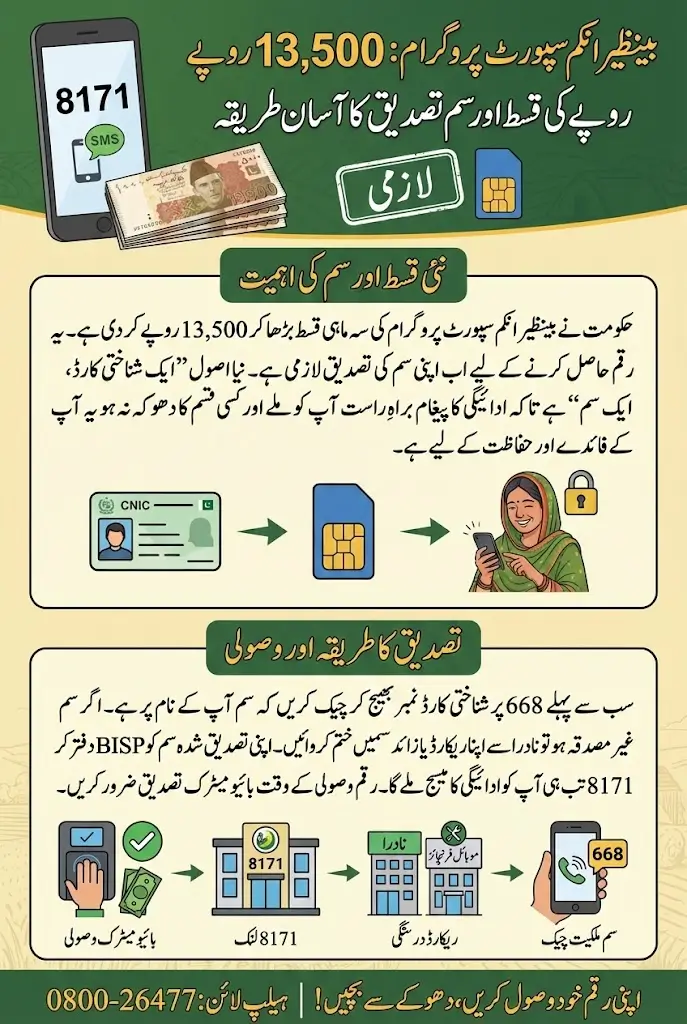
SIM verification is now a critical step for all beneficiaries. Many families face delays or disqualification simply because the mobile number they use is not registered against their own CNIC. By implementing a “One CNIC, One SIM” policy, BISP ensures that messages regarding payments are received directly by the beneficiary. The 8171 system now relies on verified SIMs to send payment messages, and future installments may also be integrated with digital wallets like JazzCash or EasyPaisa. Beneficiaries are strongly advised to complete the verification process before visiting BISP payment centers to avoid delays or complications.
Why SIM Verification is Mandatory?
SIM verification ensures that the payment process is safe, secure, and directly linked to the beneficiary. In previous years, many beneficiaries relied on relatives’ or agents’ phones, which often led to fraud and delayed payments.
By verifying your SIM:
- You receive direct payment alerts from 8171 on your number
- Fraud and unauthorized access are prevented
- Your payment may eventually be linked to mobile wallets for faster transactions
This verification is essential for both new applicants and existing beneficiaries who have stopped receiving messages.
Why Your BISP SIM Shows “Unverified” and How to Fix It Quickly
Sometimes beneficiaries face a situation where they receive a new SIM from the BISP office, open their digital wallet, but the system still shows the number as “Unverified.” This often creates confusion, especially when all steps appear to be completed correctly. In most cases, the issue occurs due to an expired CNIC, network delay, or the beneficiary already having five active SIMs registered under their name. When the system reaches the limit of five SIMs, verification cannot proceed until one SIM is removed from the database.
If this happens to you, the first step is to visit your nearest BISP Tehsil Office. Ask the staff to check the exact reason why your SIM is appearing as unverified. If they confirm that your CNIC has expired, visit NADRA first to renew your CNIC and then return to BISP for verification. If they tell you that you already have five SIMs registered under your CNIC, you must fix this issue at the telecom franchise before returning.
- Visit your nearest mobile network franchise (Jazz, Zong, Telenor, Ufone).
- Request the representative to block or deactivate one unused SIM under your CNIC.
- Complete the biometric verification process to confirm the removal of the SIM.
- Once the SIM count is reduced, visit the BISP Tehsil Office again.
- Ask the representative to re-verify your new SIM or receive a fresh SIM if needed.
- After verification, reopen your BISP wallet and the status should now change to “Verified.”
Once these steps are completed, your SIM will be successfully registered, and you will be able to access your BISP payments without any further verification errors. If the issue continues even after completing all requirements, contact the BISP helpline or request assistance from the Assistant Director at your Tehsil Office for manual correction.
Also Read: CM Punjab Green Tractors Scheme Phase III Lucky Draw Results Released
How To SIM Ownership Check?
Before visiting any BISP office, beneficiaries must ensure that the SIM card they use is legally registered under their CNIC. This prevents common issues where a number may belong to a husband, son, or another family member.
Step-by-Step SIM Audit:
- Open your mobile dialer
- Type your CNIC number without dashes
- Send the SMS to 668 (PTA Information System)
- Analyze the reply from PTA, which will list all SIMs registered under your CNIC
Decision points:
- If your number appears: proceed to biometric verification
- If no SIM appears: purchase a new SIM under your own CNIC
- If unknown SIMs appear: block or deactivate them to prevent misuse
This step ensures that the SIM is legally yours and avoids potential issues during payment collection.
How to Update NADRA Records if Your SIM Shows “Unverified”?
If your SIM is not verifying for BISP or 8171, the issue often comes from outdated NADRA records. Below are the steps to fix the problem in a simple and clear process.
- Visit your nearest NADRA Registration Center to check your CNIC status.
- Renew your CNIC immediately if it is expired or near expiry.
- Update your family details, including children’s B-Forms and marital status.
- Request fresh biometric verification if your thumbprints are not matching.
- Ask the NADRA officer to update any missing or incorrect information linked to your ID.
- After the update, wait for 24–48 hours for the new record to sync with the national database.
- Return to the BISP office or mobile franchise to verify your SIM again.
- Complete biometric verification to link your SIM with your CNIC successfully.
Once your NADRA details are updated, the BISP system can easily verify your identity. This ensures your SIM becomes fully approved, allowing you to receive the 13,500 payment without delays or errors.
Updating the Record in the 8171 Database
Buying a new SIM is not sufficient; the number must be linked to the 8171 system. This step is often overlooked by many beneficiaries.
At the BISP Tehsil Office:
- Visit the Registration Desk or Data Entry counter
- Bring your original CNIC and the active SIM card
- Request the operator to update your mobile number in the NSER software
- Verify by receiving a system-generated test message on your phone
Completing this step ensures that your verified SIM will receive all future payment alerts.
Also Read: How To Apply For the Punjab Widow Support Card 2026 To Get 100,000 and 25,000 Per Child
Checking Your Eligibility and Payment Status
Once the SIM is verified and linked, beneficiaries can confirm their eligibility and payment status.
Methods to check:
- Open the messaging app and send your 13-digit CNIC to 8171
- Wait for a reply indicating eligibility and payment status
- Alternatively, visit the 8171 web portal: https://8171.bisp.gov.pk
- Enter CNIC and captcha code to see detailed status, complaints, or survey requirements
This step ensures that you are aware of when and how to collect your Rs. 13,500 installment.
Collecting the Rs. 13,500 Cash
After receiving the “Payment Transferred” SMS, beneficiaries can collect their cash from BISP Campsites or designated bank retailers (HBL Konnect / Bank Alfalah).
Step-by-step collection:
- Bring your original CNIC
- Visit the official BISP campsite or bank retailer
- Biometric verification: place your thumb on the device
- Check for green confirmation on the screen
- Count your cash; it must be exactly Rs. 13,500
- Take the printed receipt as proof of payment
- Report any discrepancies to the helpline 0800-26477 immediately
This ensures safe and accurate receipt of your entitlement.
Troubleshooting Biometric Verification Failures
Beneficiaries with worn fingerprints may face verification issues.
To resolve:
- Apply glycerin and rose water to hydrate your fingers before visiting
- Visit NADRA for biometric re-verification if errors persist
- File a “Biometric Failure” complaint at BISP to receive payment via verification code if needed
This ensures that no beneficiary misses their payment due to biometric issues.
Guidelines for New Families
New families must first enter the BISP system through the Dynamic Survey process.
Survey procedure:
- Visit the NSER center inside BISP Tehsil Offices
- Provide details about family members, education, and assets
- Complete the survey truthfully as it is cross-checked with other government databases
- Wait 3-6 months for the poverty score calculation; scores below 32 qualify for payments
Following these steps ensures proper registration and eligibility for the Rs. 13,500 installment.
Important Security Guidelines
Beneficiaries should remain cautious to avoid scams.
Key points:
- BISP never asks for fees during SIM verification, survey, or withdrawal
- Ignore calls claiming to be BISP officers requesting payment
- Never share your OTP with anyone
- Always use official centers for SIM updates and cash collection
Adhering to these rules ensures safe and secure receipt of payments.
8171 Payment Checklist
Beneficiaries can use the following checklist to prepare:
| Step | Requirement/Action | Remarks |
|---|---|---|
| SIM Verification | Check SIM ownership via 668 | Ensure the SIM is under your CNIC |
| Biometric Update | Visit franchise for thumb verification | Update in NADRA database |
| 8171 Database Update | Link SIM to NSER | Test SMS confirmation |
| Eligibility Check | SMS 8171 or visit portal | Confirm payment and survey status |
| Cash Collection | Biometric verification at campsite/bank | Receive Rs. 13,500 with receipt |
These are all critical steps to ensure smooth payment reception.
Conclusion
The 8171 payment SIM verification process is a vital step for new and existing BISP families to receive their quarterly Rs. 13,500 installment. By following the step-by-step guide, beneficiaries can avoid delays, ensure security, and receive their payments directly.
Ensuring SIM ownership, biometric verification, database updates, and following proper collection protocols will guarantee that your entitled support reaches you efficiently. With these steps in place, BISP has strengthened transparency and convenience for all families.
Also Read: 8070 PSER Survey Ineligibility Criteria Explained For Ramzan Relief Program 2026
FAQs
Can I use my husband’s SIM if he is away?
No. Only your own verified SIM registered under your CNIC will receive payment messages.
What should I do if I lost my SIM?
Obtain a duplicate SIM from your network franchise and ensure it is active in your name before linking to 8171.
Can I check payment status on a basic mobile phone?
Yes. The 8171 SMS service works on all phones, including feature phones without internet.
What if an agent demands a commission for cash collection?
Do not pay. Report the agent immediately to the BISP Tehsil Office Assistant Director.
How long does it take for new families to receive payments after registration?
It may take 3-6 months for survey completion and poverty score verification before payment is disbursed